Children Handwrite: Your Guide to Avoiding Common Font Pitfalls
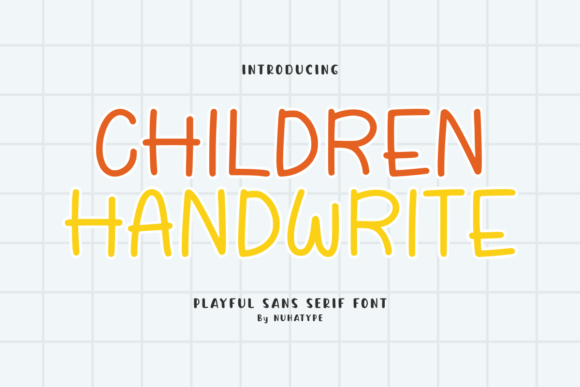
You’ve found it—the perfect font. Children Handwrite is a cute, sans serif handwriting font that immediately brings a soft, friendly, and natural look to any project. Its warm, handcrafted feeling is ideal for everything from kids' worksheets and classroom printables to DIY designs and craft projects. With its simple strokes and smooth curves, it's designed to be beautiful and functional. But even with a fantastic font, a few common missteps can hold your designs back. Let's explore how to use Children Handwrite effectively and avoid the frustrations that trip up many creators.
Understanding the Font's True Character
Many people download a font like Children Handwrite and immediately start using it at large sizes for headlines, which is where it shines. The mistake comes when they try to use it for long paragraphs of body text. While its friendly style is inviting, its casual, handwritten nature can make dense blocks of text difficult to read, especially at smaller sizes. The charm of the font can become a barrier to comprehension if overused.
A better approach is to think of Children Handwrite as a specialty tool. Use it for titles, quotes, labels, and short, impactful phrases on greeting cards or bullet journal headers. For the main body of a worksheet or the detailed instructions on a printable, pair it with a clean, highly legible sans-serif or serif font. This combination maintains the playful aesthetic while ensuring your content is clear and accessible for everyone, including young learners or busy parents.
The Cutting Machine Conundrum
A major selling point of Children Handwrite is its suitability for Cricut and Silhouette machines. However, a frequent oversight is failing to test the font's "cuttability" with your specific material and blade before committing to a final project. A design that looks perfect on screen can become a tangled mess of vinyl or a paper-tearing nightmare if the letters are too thin, too close together, or have intricate details that your machine struggles with.
Before you cut your final stickers or labels, always perform a test cut. Create a small sample of your design using the actual material. Pay close attention to the spacing between letters and the thickness of the strokes. While Children Handwrite is designed with smooth curves, you may need to slightly increase the letter spacing in your design software to ensure clean, separate cuts. This small step saves time, material, and the headache of a ruined project.
Overlooking Licensing and File Formats
In the excitement of finding the perfect font for your small business products or blog graphics, it's easy to overlook the licensing terms. A common mistake is assuming all fonts are free for any use. Children Handwrite, like many quality fonts, comes with a specific license that dictates how you can use it—whether for personal projects, commercial products, or print-on-demand services.
Always read the license agreement thoroughly before you download and use the font. Check if it permits the creation of physical goods for sale, digital templates for download, or use in client work. Furthermore, ensure you are installing the correct file format (like .OTF or .TTF) for your operating system. Using the wrong format can lead to installation issues or missing characters, disrupting your workflow and delaying your project.
Matching the Font to the Message
The warmth of Children Handwrite makes it a go-to for projects aimed at children or those requiring a gentle touch. A nuanced mistake, however, is applying it to contexts where its playful nature might undermine the message. For instance, using it for serious educational content about safety rules or for formal communications from a professional service could create a confusing tone.
Consider the context and audience. This font is perfect for a child's birthday invitation, a set of positive affirmation cards, a scrapbook page, or the title on a coloring page. It adds personality to bullet journal headers and makes DIY planners feel more personal. For projects that require a more neutral or authoritative tone, reserve Children Handwrite for accent elements only, or choose a different font altogether. The goal is to enhance communication, not distract from it.
Practical Tips for Superior Results
To get the most out of this charming font, integrate these checks into your design process:
- Test Readability: Always print or view your design at its intended size. What looks great on a large monitor might be illegible when printed as a small label.
- Check Kerning: Manually adjust the spacing between specific letter pairs (like "a" and "v" or "T" and "o") that might appear too far apart or too close together. Most design software allows for manual kerning adjustments.
- Use Glyphs: Explore the font's full character set. Many fonts include alternate letters, swashes, or ligatures that can add extra flair and uniqueness to your designs. Look for these in your software's glyphs panel.
- Consider Color and Contrast: A soft, handwritten font can get lost on a busy background or with low-contrast color choices. Ensure your text stands out clearly for maximum impact.
By approaching Children Handwrite with a bit of strategic thinking, you move beyond simply using a pretty font. You become a more effective designer, creating projects that are not only visually appealing but also functional, clear, and perfectly suited to their purpose. This thoughtful application is what separates good projects from great ones, ensuring your creations truly resonate with your audience.