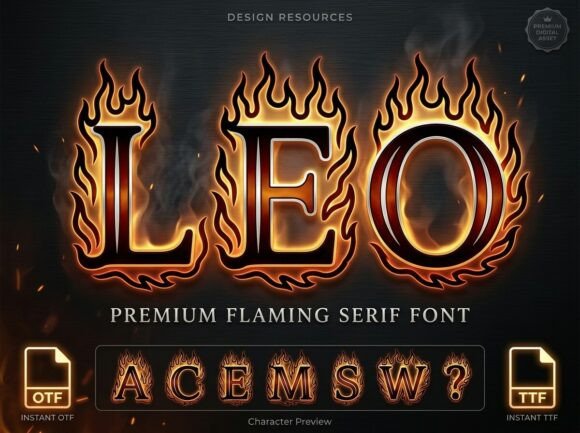
Leo: Mastering the Art of the Flaming Serif Font
In the crowded world of digital typography, standing out is not just a goal—it is a necessity. Whether you are designing a logo for a high-performance automotive brand, creating packaging for a fiery new hot sauce, or titling a cinematic action sequence, you need a typeface that communicates intensity immediately. Enter Leo, a premium flaming serif font that combines authoritative letterforms with the raw energy of hand-drawn fire. However, possessing a powerful tool is only half the battle; knowing how to wield it effectively separates amateur work from professional design.
Understanding the Anatomy of Leo
Before integrating Leo into your creative workflow, it is crucial to understand what makes this font distinct. Unlike standard serif fonts that rely solely on ink-on-paper mechanics, Leo is a display typeface built for maximum heat and visibility. Its structure features high-contrast serif letterforms encased in a vivid, hand-drawn flame silhouette. The internal textures often carry a shimmering metallic quality, paired with rhythmic, blazing outlines.
This combination means that Leo is not a "set it and forget it" typeface. It is a spectacle. It demands attention, but it also requires careful handling. Many users make the mistake of treating specialized display fonts like standard workhorse typefaces, leading to designs that feel cluttered or illegible. Recognizing Leo as a premium display asset is the first step toward using it correctly.
The Common Pitfall: Overpowering the Design
The most frequent mistake beginners and even intermediate designers make with a font like Leo is using it too liberally. Because the font features such intricate detailing—specifically the flame silhouettes and metallic textures—it creates significant visual noise. If you use Leo for an entire paragraph or even a long sub-headline, you risk overwhelming the viewer.
Imagine a movie poster where the entire plot summary is written in flames. It would be impossible to read and physically exhausting on the eyes. This is a classic case of style defeating function. When a design becomes unreadable, the message fails, no matter how "cool" the font looks in isolation.
The Solution: Restraint and Hierarchy
To avoid visual overload, you must treat Leo as a highlighter, not the body text. Use it exclusively for short, impactful phrases. Think single words or three-to-four-word headers.
Consider a logo for a motorsport team. Instead of spelling out the full team name "The Midnight Velocity Racers" in Leo, which could look cluttered, use the font only for the word "VELOCITY." Pair it with a clean, sans-serif font for the rest of the text. This creates a visual hierarchy where Leo provides the energy, and the secondary font provides clarity. This approach ensures your design looks professional rather than chaotic.
Color Theory and Metallic Textures
Another area where users often stumble is color application. Leo is defined by its high-impact visibility, but that visibility is dependent on contrast. A common misunderstanding is that because the font is "bright" or "metallic," it will work on any background. This is rarely true.
Avoiding the "Muddy" Look
If you place Leo on a background that is too busy—for example, a photograph with high texture or multiple contrasting colors—the flame details will merge with the background, creating a muddy, indistinct image. The "shimmering metallic internal textures" that make the font special will be lost.
Furthermore, be cautious with color clashes. Fire is naturally warm (oranges, reds, yellows). If you apply a cool blue overlay to the font or place it against a neon green background, the result can feel dissonant unless you are specifically aiming for a psychedelic or surreal aesthetic. For high-octane action films or spicy food packaging, sticking to high-contrast, complementary color schemes usually yields the best results.
Better Approaches for Backgrounds
For maximum heat and readability, place Leo against dark, solid backgrounds. Deep blacks, charcoal greys, or midnight blues allow the flame silhouettes to pop, making the font appear as if it is actually emitting light. If you must use a photographic background, consider adding a dark gradient overlay behind the text to separate the typography from the image noise.
Resolution and Scalability Issues
A technical oversight that often plagues creators is failing to consider the medium of display. Leo is a detailed typeface. The "rhythmic blazing outlines" contain fine lines and intricate curves. These details look stunning on a high-resolution Retina screen or a large-format print, but they can become problematic in low-resolution environments.
The Digital vs. Print Divide
If you attempt to use Leo as a very small favicon, an app icon, or on low-DPI digital displays, the fine flame details may blur into a single red blob. The font loses its definition and looks like a rendering error rather than a design choice.
Before finalizing your design, always zoom out or view the design at 100% scale on the target device. If the text is illegible at the size it will be displayed, you have two options:
- Increase the size: Make the headline larger to preserve the integrity of the details.
- Simplify: If the application requires small text (like a business card header), Leo might not be the appropriate choice. It is best suited for large-scale applications like posters, banners, and title cards.
Licensing and File Management
For entrepreneurs and freelancers, the practical side of font management is just as important as the aesthetics. A common mistake is assuming that all versions of a font file are licensed for commercial use. Leo is a premium typeface, meaning it typically requires a specific license for commercial projects.
Using a "free" version found on a dubious website not only exposes you to legal risk but often results in using an incomplete file. Pirated versions of complex fonts like Leo frequently lack the full character set or the OpenType features required for the metallic textures to render correctly.
Always download Leo from the original foundry or authorized resellers. Ensure you understand the difference between a desktop license (for logos and prints) and a web font license (for websites). Keeping your font files organized and your licenses up to date prevents legal headaches and ensures you have the highest quality file for your project.
Final Checks Before You Launch
Before you export your final project, take a moment to evaluate your use of Leo critically. Ask yourself these questions to ensure you are making the right decision:
- Is the text readable in under three seconds? If a viewer has to squint to read the header, the font is not working.
- Does the font match the brand voice? Leo is aggressive and energetic. It works for extreme sports and action films, but it would be a poor choice for a meditation app or a law firm.
- Have I tested it in black and white? While Leo is defined by its color and fire effects, checking a grayscale version ensures the underlying letterforms are strong enough to hold up if the color is removed.
By avoiding the common traps of over-design, poor color contrast, and technical mismatches, you can harness the true power of Leo