Boring: Mastering the Sophisticated Rhythm of Autumn Typography
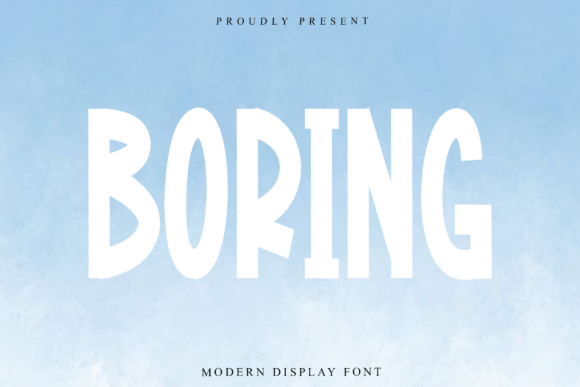
At first glance, the name might suggest a lack of imagination, but Boring is anything but dull. In the world of typography, this script font represents a sophisticated, rhythmic voice that captures the very essence of autumnal elegance. As part of a modern handwritten collection, Boring features high-contrast strokes that command attention—thick, grounded downstrokes provide stability, while delicate hairline connectors offer a whisper of movement. It is a typeface designed not just to be read, but to be experienced, making it a premier asset for seasonal marketing, artisanal packaging, and high-end editorial work.
However, the path from downloading a premium script font to achieving a professional result is often fraught with technical pitfalls. Many designers and entrepreneurs acquire Boring with the best intentions, only to find that their final output looks cluttered, illegible, or structurally unsound. The issue usually lies not in the font itself, but in how it is applied. To truly unlock the potential of Boring’s vertically elongated letterforms and graceful, looping ascenders, one must navigate the common mistakes that plague script typography.
The Trap of Overcrowding: Ignoring the Hairline Connectors
The most frequent error users make with Boring is treating it like a standard block font. Because Boring is characterized by delicate hairline connectors—those thin strokes that link one letter to the next—it requires specific spacing adjustments. A common beginner mistake is setting the tracking (letter-spacing) too wide. When you apply positive tracking to a script font like Boring, you effectively sever the visual connection between letters. The illusion of continuous ink flow is broken, and the text looks disjointed.
Conversely, setting the tracking too tight can be equally disastrous. The thick, grounded downstrokes of Boring are physically wider than the delicate connectors. If you squeeze the letters together, these heavy vertical strokes will collide, creating visual "clots" that make the text unreadable.
The Better Approach: Always set the tracking to zero or a slightly negative value, but rely on kerning rather than tracking to fix spacing issues. However, with a sophisticated font like Boring, manual kerning is often required. Look specifically at the transition between the thick downstroke of one letter and the tall ascender of the next. You may need to overlap the hairline connector slightly beneath the previous letter’s stroke to maintain the rhythm without causing collision.
Contextual Integrity: Why Boring Isn't for Body Copy
One of the most damaging misunderstandings regarding display fonts is their versatility. Boring is an expressive, high-contrast script. Its power lies in its verticality and its high-end inkwork aesthetic. Using this font for long-form paragraphs, product descriptions, or instructional text is a critical error that undermines usability.
When Boring is sized down to 10 or 12 points for body copy, its delicate hairline connectors disappear, and the high-contrast strokes turn into visual noise. The result is a "gray" texture on the page that is impossible to scan, frustrating the reader and hurting the communication flow of your design.
The Solution: Use Boring exclusively for headers, sub-headers, and pull quotes. Its vertical elongation makes it perfect for creating tall, narrow text blocks that draw the eye upward. For the supporting text, pair Boring with a clean, high-readability sans-serif or a gentle serif font. This contrast allows Boring’s "unique and professional" voice to shine without competing with the functional text, ensuring your message remains accessible to your audience.
The Color and Texture Mismatch
Boring is an autumnal typeface by nature. Its strokes mimic high-end inkwork, suggesting texture and flow. A frequent mistake is placing this font against rigid, overly digital backgrounds—think neon gradients, harsh grid patterns, or overly pixelated images. This clash of aesthetics creates cognitive dissonance; the font feels "pasted on" rather than integrated into the design.
Furthermore, the high contrast of the font—black strokes against white space—can be jarring if not handled with care. Using pure black (#000000) on pure white (#FFFFFF) can sometimes strip the font of its artisanal warmth, making it look stark and clinical.
Practical Advice: Lean into the font's heritage. Use warm, earthy color palettes that evoke the autumn season—deep burgundies, forest greens, warm grays, or rich chocolates. If you must use a dark background, ensure the text color has enough luminosity to let the hairline connectors read clearly. Adding a subtle paper texture or grain to the background can also help ground the font, reinforcing the artisanal packaging or boutique invitation vibe it was designed for.
Overusing Stylistic Alternates
Modern script fonts often come loaded with OpenType features, including stylistic alternates, swashes, and ligatures. Boring is no exception. The mistake here is twofold: either ignoring these features entirely, resulting in a static and repetitive look, or using too many of them at once, creating a chaotic mess of loops and swirls.
If every letter uses its most extravagant swash, the text loses its rhythm. The beauty of Boring is in its balance between the grounded downstrokes and the delicate connectors. Over-swashing disrupts this balance.
A Better Choice: Use alternates strategically. Perhaps use a swash capital letter only at the beginning of a sentence or a headline. If you are writing a word like "Autumn," check if the "u" and "m" have ligatures that connect them more smoothly than the standard default. The goal is to mimic natural handwriting, where not every letter is a performance. Selective application of these features ensures the typography feels bespoke rather than over-designed.
Checking for Technical Quality Before Committing
Before fully integrating Boring into a professional project or a large-scale marketing campaign, you must evaluate the technical construction of the file. Not all fonts are created equal, and even premium-looking fonts can have hidden flaws that cause headaches later.
What to Check:
- Bounding Boxes: In some poorly made fonts, the bounding box (the invisible container around the letter) extends too far beyond the visible ink. This makes aligning Boring with other elements incredibly difficult, as the software aligns the box, not the visual stroke.
- Node Count: High-end inkwork aesthetic can sometimes hide excessive vector points. If the font file is heavy, it can slow down rendering in complex layout software like Adobe InDesign or Illustrator.
- OpenType Compatibility: Ensure your specific software (whether it's Canva, Procreate, or the Adobe Suite) fully supports the specific OpenType features of Boring. Canva, for instance, sometimes struggles with complex contextual alternates, which might require you to manually separate letters to apply the style you want.
Final Thoughts on Application
Boring is a typeface that demands respect for its craft. It is a tool for creating mood, specifically the sophisticated, rhythmic feeling of high-end autumnal design. By avoiding the pitfalls of overcrowding, misuse in body copy, and stylistic excess, you can elevate your work from amateur to artisan. Treat the font not as a simple set of characters, but as a piece of illustration. Give it space to breathe, pair it with complementary textures, and let its grounded downstrokes anchor your next seasonal campaign.