Hand Dingbats: The Icon Font for Playful, Expressive Design
In the digital world, where text can often feel flat and impersonal, we constantly seek ways to inject personality and human connection into our designs. While photographs and illustrations are powerful, they can be cumbersome to manage. What if you could add a burst of expressive, human energy with the same ease as typing a letter? Enter Hand Dingbats, a comprehensive icon font that brings a library of toony hand gestures right to your fingertips.
What Exactly is an Icon Font?
Before diving into the specifics of Hand, it's helpful to understand the tool at its core: the icon font. At first glance, it might seem like a collection of tiny images, but it's much more clever than that. An icon font is a font file, just like Arial or Times New Roman, but instead of containing letters and numbers, it contains symbols and icons.
This is a game-changer for designers and developers for several reasons:
- Scalability: Because they are vector-based, icons from a font like Hand can be scaled to any size—from a tiny footnote to a massive hero banner—without losing quality or becoming pixelated.
- Performance: A single font file is often much smaller than a collection of individual image files (like PNGs or SVGs), leading to faster website load times.
- Easy Customization: You can change the color, size, and even add effects like shadows or outlines using simple CSS, just as you would with any text. No image editing software required.
The Expressive Power of Hand Dingbats
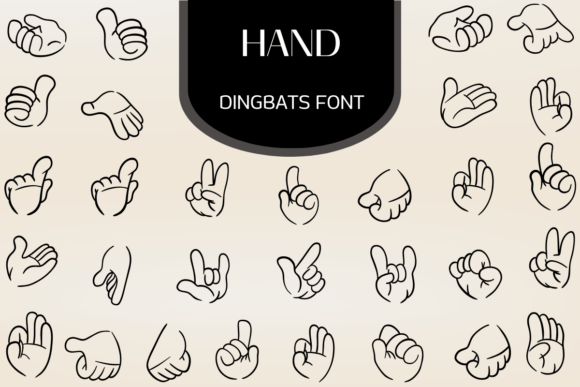
The true magic of Hand lies in its character. This isn't a sterile, corporate icon set. It's a vibrant collection of toony hand gestures designed for maximum expression. The library is vast, featuring a wide range of universally understood signals that can instantly convey a message or mood.
A Gesture for Every Occasion
Imagine needing to add a quick, positive affirmation to a button. With Hand, you simply type the corresponding character for a thumbs-up icon. Need to guide a user's attention? A pointing finger icon is just a keystroke away. The library includes a rich variety of gestures, such as:
- Affirmative & Encouraging: Thumbs up, high-fives, and "OK" signs.
- Playful & Peaceful: Peace signs, waving hands, and "call me" gestures.
- Attention-Grabbing: Pointing fingers (left, right, up, down) to direct the eye.
- Cool & Edgy: Rock-on symbols, fist bumps, and other trendy gestures.
Each icon in the Hand font is crafted with bold, clean outlines. This deliberate design choice ensures high legibility, even at smaller sizes, and gives them a modern, energetic feel that pops off the screen. They are designed to be fun, friendly, and instantly recognizable.
Where Can You Use Hand? Real-World Applications
The versatility of an icon font like Hand makes it a valuable asset across a surprising range of projects. Its playful nature makes it particularly well-suited for contexts where personality and engagement are key.
1. Gaming and Entertainment Interfaces
In the world of gaming, user interface (UI) elements are crucial for player experience. Hand gestures can be used to create intuitive and thematic buttons for actions like "Start Game," "Like," "Share Achievement," or "Warning." A fist bump icon for a "Play Again" button feels far more engaging than a simple text link.
2. Educational Materials and E-Learning
Keeping students engaged is a primary goal in education. For children's apps, interactive worksheets, or e-learning modules, Hand can be used to create visual cues. A pointing finger can highlight a key piece of information, a thumbs-up can signify a correct answer, and a waving hand can offer a friendly welcome.
3. Kids Apparel and Merchandise Design
When designing for a younger audience, bold and simple graphics are essential. The clean outlines of the Hand icons are perfect for screen printing on t-shirts, tote bags, and other apparel. A collection of peace signs, rock-on symbols, and high-fives can create a fun, energetic design that resonates with kids and teens.
4. Modern Web and App Design
Beyond niche applications, Hand can add a touch of humanity to any digital project. Use a waving hand as a friendly welcome on a landing page. Employ pointing fingers to guide users through a multi-step form. Add a thumbs-up icon to a "like" button on a blog or social feed to make interactions feel more personal and less robotic.
Evaluating Hand for Your Project: Strengths and Considerations
While Hand is a powerful tool, it's important to understand its strengths and limitations to use it effectively. Like any design asset, its suitability depends on the context of your project.
Strengths to Leverage
- Instant Personality: Its greatest strength is its ability to inject playfulness and a human touch into designs that might otherwise feel sterile.
- Consistency: As a font, all the icons share a consistent visual style (line weight, corner radius, etc.), ensuring a cohesive look across your project.
- Efficiency: It dramatically speeds up the design and development workflow. Adding an icon is as simple as typing a character, and styling it is handled by CSS.
- Lightweight: A single font file is highly optimized for web use, contributing to better site performance compared to using numerous image files.
Practical Considerations and Limitations
- Thematic Mismatch: The toony, expressive style of Hand is not suitable for every context. It would feel out of place on a formal corporate website, a luxury brand's platform, or a site dealing with serious legal or financial information.
- Limited Scope: Hand is a specialized font. It excels at hand gestures but won't have icons for other common needs like social media logos, arrows, or technical symbols. You will likely need to pair it with a more general-purpose icon font.
- Accessibility: Icons used as text characters can be problematic for screen readers. It's crucial to implement them correctly using techniques like
aria-labelattributes or visually hidden text to ensure your content remains accessible to all users.
Is Hand the Right Choice for You?
To determine if Hand is the right fit, ask yourself a few key questions about your project's goals and audience.
- What is the tone of my project? If the answer is playful, energetic, friendly, or youthful, Hand is likely a great match. If it's formal, corporate, or minimalist, you should probably look elsewhere.
- Who is my target audience? The font resonates strongly with children, teens, and young adults. It's also effective for any audience that appreciates a more casual and human approach to design.
- What is the primary function of the icons? If you need to convey simple, human-centric actions and emotions (like, agree, look here, hello), Hand is perfect. For functional UI icons (settings, search, navigation), a standard icon set would be more appropriate.
Ultimately, Hand Dingbats is more than just a collection of symbols; it's a tool for communication. It allows creators, designers, and business owners to break free from the constraints of plain text and add a layer of expressive, non-verbal flair to their work. By understanding its unique strengths and applying it thoughtfully, you can create layouts and interfaces that are not only functional but also genuinely engaging and full of personality.